
AbairTechSolutionDIGITAL SOLUTIONS FOR A SMARTER TOMORROW

Menu

Home › Mobile Apps › PDF Signer
Free · Android & iPhone · Offline

PDF Signer: Sign, Fill & Edit PDFs on Your Phone

Sign contracts, fill out forms and send documents back in seconds – without printing, scanning or creating an account. Everything stays on your phone.

COMING SOON ONGoogle PlayCOMING SOON ON THEApp Store

Want it the day it launches? Get the link on WhatsApp →

No loginNo adsWorks offlineAES-256 protection
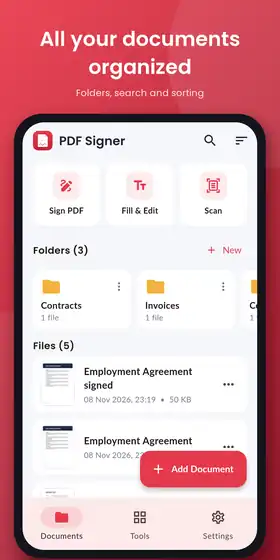
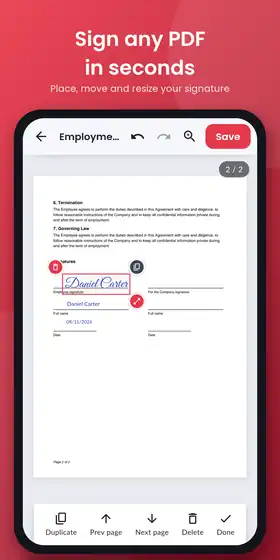
PDF Signer home screen with Sign PDF, Fill and Edit, Scan, folders and filesPlacing and resizing a signature on a PDF agreement in PDF Signer

Everything you need to finish a document

Open a PDF from WhatsApp, email or your files, add what it needs and send it back – in one app.

Sign any PDF

Draw your signature with a natural pen feel, type it in elegant signature fonts, or photograph it on paper – the white background is removed for you.

Fill & edit

Type text anywhere with your choice of font, size and colour. Add dates, ticks, crosses, icons, photos, logos or stamps. Undo and redo every step.

Interactive forms

Form fields are detected automatically. Fill text boxes, checkboxes, drop-downs and radio buttons, then lock the form so values can no longer be changed.

Merge, split & organize

Combine several PDFs into one, reorder, rotate and delete pages, split a file or extract just the pages you need.

Scan & convert

Scan paper documents with your camera, or turn photos into a PDF in A4, Letter or photo size.

Protect & share

Add a password with AES-256 encryption or remove one. Share by WhatsApp, Email or Gmail, or save to Downloads or Drive.

Sign a document in 4 steps

No printer, no scanner, no account.

Open the PDFTap Add Document, or open a PDF straight from WhatsApp, email or your files.
Create your signatureDraw, type or upload it once – it is saved for every future document.
Place and add detailsDrop the signature on the line, resize it, and add your name, date or ticks.
Save and sendSave the signed PDF and share it back in one tap. The text stays sharp and searchable.

Private by design

Contracts, IDs and bank forms should not leave your phone just to be signed. PDF Signer was built so they never have to.

  • Works 100% offline – the app does not even request internet permission
  • Your documents and saved signatures stay on your device
  • No account, no ads and no tracking
  • Organize files in folders, search and sort by name or date

Built by AbairTech Solution

We are a software company in Faisalabad, Pakistan, building business software, Oracle APEX systems and mobile apps such as Resume Builder and Abair Car Parking.

Need help or a feature for your business? WhatsApp or call +92 300 2005404, or email support@abairtechsolution.com.

Frequently asked questions

Is PDF Signer free?

Yes. The app is free, with no ads and no account required.

Does it work without internet?

Yes. Everything – signing, editing, merging, scanning and password protection – works offline on your phone.

Are my documents uploaded anywhere?

No. Documents and signatures stay on your device. A file only leaves your phone when you choose to share it with an app you pick.

Can I fill PDF forms with checkboxes and drop-downs?

Yes. Interactive form fields are detected automatically, and you can lock (flatten) the form after filling it.

When will it be on Google Play and the App Store?

PDF Signer is in final testing. Send us a WhatsApp message and we will share the download link as soon as it is live.

Need a custom app for your business?

AbairTech builds Android and iOS apps, web apps and business software.

See our appsWhatsApp Us